


Introduction
Client segmentation becomes increasingly important as a business manages more customers, prospects, industries, sales opportunities, and relationship histories. A basic spreadsheet can store client information, but storing data is not the same as organizing it for meaningful segmentation. Premium templates can provide more structured fields, standardized categories, filtering options, formulas, dashboards, and reporting tools that make customer groups easier to identify and manage. However, premium does not automatically mean better. The real advantage comes from whether the template provides the structure and functionality needed to segment clients consistently and turn those segments into useful business actions.
What Is Client Segmentation?
Client segmentation is the process of dividing a customer or prospect database into meaningful groups based on shared characteristics, behaviors, needs, value, or relationship status.
Instead of treating every customer as an identical record, segmentation helps a business recognize differences between accounts.
For example, a service business may categorize clients by:
- Industry
- Company size
- Customer type
- Service purchased
- Account value
- Sales stage
- Location
- Engagement level
- Customer status
- Purchase frequency
- Renewal timing
- Priority
- Lead source
The purpose is not simply to create more categories. Effective segmentation should help a business make better decisions about communication, sales activity, service priorities, and relationship management.
A spreadsheet becomes more useful when its structure makes those distinctions easy to record, filter, analyze, and maintain.
Why Basic Spreadsheets Often Struggle With Segmentation
A simple client spreadsheet may contain only a few fields such as name, email, phone number, company, and notes.
That can work when the database is small.
As the client base expands, however, the business may need more meaningful classification.
One client might be a high-value recurring customer, while another is a new prospect. One may require frequent account reviews, while another only needs occasional communication. A third may represent a strategic opportunity but have no current revenue.
If all three appear as nearly identical rows, the spreadsheet does not provide enough context for effective prioritization.
The limitation is therefore not necessarily the number of rows. It is the quality and structure of the information attached to each record.
Premium Templates Can Provide Better Data Structure
One of the strongest advantages of a professionally structured template is the ability to organize client information into clearly defined fields.
Instead of relying heavily on free-form notes, a structured workbook can separate information into categories such as:
Client Profile
Company, contact, industry, location, company size.
Relationship Information
Account owner, customer status, relationship stage, priority.
Sales Information
Lead source, sales stage, opportunity value, expected close date.
Activity Information
Last interaction, next follow-up, task status, communication type.
This structure makes segmentation easier because each characteristic exists as a usable data field rather than buried inside paragraphs of notes.
The source material emphasizes client data organization, contact management, lead tracking, sales pipelines, follow-ups, dashboards, customization, and structured workflows as relevant components of professionally developed client management spreadsheets.
Standardized Categories Make Segmentation More Reliable
Segmentation becomes unreliable when users enter the same information in different ways.
Imagine an industry field containing:
- Technology
- Tech
- Tech Industry
- Technology Services
- IT
A human can understand that these entries may describe similar businesses. Excel cannot automatically treat them as identical in every situation.
The same problem can occur with customer status:
- Active
- Current
- Existing
- Active Client
Dropdown lists and standardized categories can reduce this inconsistency.
A premium template may provide predefined lists that encourage users to select standardized values rather than entering variations manually.
That matters because reliable segmentation depends on reliable data.
Dropdowns Can Improve Classification
Dropdown menus are particularly useful for fields that require controlled choices.
For example, a business could define a Customer Tier field with:
- Standard
- Premium
- Strategic
Every client can then be assigned one of those three categories.
The same approach can be used for:
- Industry
- Lead source
- Customer status
- Sales stage
- Priority
- Client type
- Account owner
This makes filtering and reporting much easier.
However, buyers should verify whether a template allows categories to be customized. A fixed dropdown that does not match the business can become a limitation rather than an advantage.
Segmentation Depends on Customization
No universal segmentation model works for every business.
A consulting firm may segment clients by industry and engagement type.
A marketing agency may focus on service package, monthly value, and campaign status.
A software service provider may prioritize account size, subscription tier, renewal date, and product usage.
Therefore, a useful client management template should provide enough flexibility to adapt its fields and categories.
Customization becomes especially valuable when the business has a specific classification model that cannot be represented through generic fields.
Filtering Turns Client Data Into Actionable Groups
A segmentation field has limited value if users cannot easily filter it.
Suppose a business has 500 client records and wants to identify all:
Premium clients in the healthcare industry with follow-ups due this month.
If the spreadsheet supports structured filtering across those fields, the user can quickly narrow the database.
Without proper filtering, the same task may require manually reviewing hundreds of rows.
This is where spreadsheet structure directly affects operational efficiency.
Filtering can help teams move from:
“Who are our clients?”
to:
“Which clients require attention right now?”
That distinction makes segmentation operational rather than merely administrative.
Dashboards Make Segments Easier to Understand
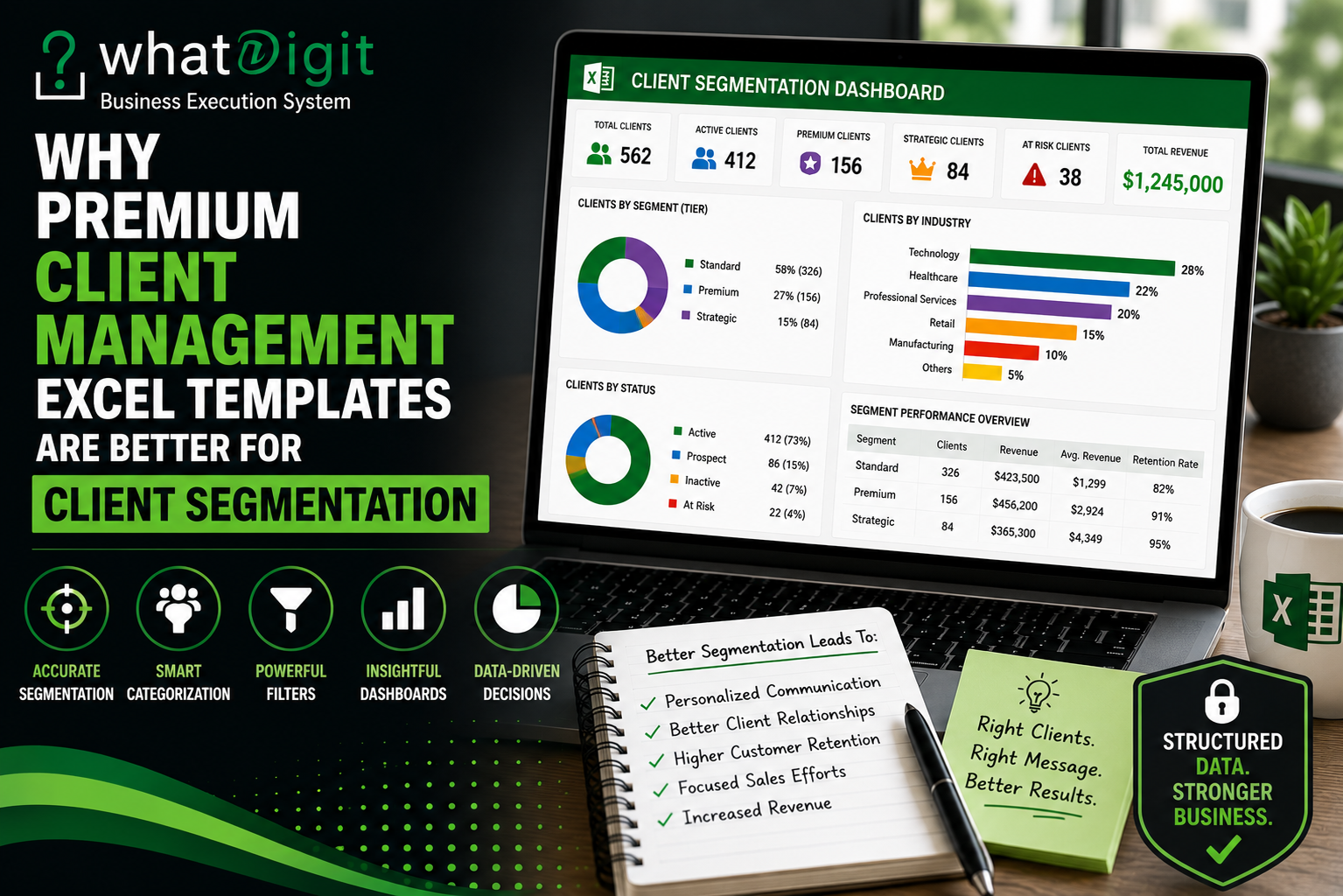
A dashboard can turn segmented client data into visual summaries.
For example, a dashboard might display:
- Clients by industry
- Clients by tier
- Active versus inactive clients
- Prospects by sales stage
- Clients by account owner
- Revenue by customer category
- Follow-ups by segment
A visual summary can help management recognize patterns without manually scanning the underlying database.
The supplied visual references specifically show client dashboards using KPI cards, client categories, follow-up information, sales pipelines, charts, and structured client interaction data.
Client Segmentation Can Improve Follow-Up Prioritization
Segmentation becomes particularly useful when connected to follow-up management.
Consider a sales team with dozens of pending follow-ups.
Instead of treating every task equally, the team can filter by:
Customer Tier + Follow-Up Status + Account Owner
This could identify high-priority accounts that require immediate attention.
Another useful combination might be:
Industry + Sales Stage + Expected Close Date
This can help sales representatives focus on specific opportunity groups.
The spreadsheet does not make the decision automatically. Rather, it gives the team a structured way to identify relevant records.
Segmentation Can Support More Relevant Communication
Different client groups often require different communication approaches.
For example, a business may communicate differently with:
- New prospects
- Active customers
- High-value accounts
- Inactive customers
- Strategic partners
- Renewal candidates
A structured segmentation system allows users to identify these groups without maintaining separate spreadsheets for each audience.
That reduces fragmentation.
Instead of creating five disconnected customer lists, the business can maintain one central database and use filters or reports to view the relevant segment.
Premium Templates Can Connect Multiple Segmentation Dimensions
Basic spreadsheets often allow one obvious classification.
More structured templates can support multiple dimensions simultaneously.
For example:
Customer Tier: Premium
Industry: Professional Services
Status: Active
Account Owner: Sarah
Follow-Up: Due This Week
That combination produces a much more useful view than simply knowing that the customer is “Premium.”
Multi-dimensional segmentation allows teams to analyze relationships between different client characteristics.
Segmentation Can Support Sales Pipeline Analysis
Client segmentation and sales pipeline management work well together.
A sales manager may want to know whether certain customer groups produce more opportunities.
For example, opportunities could be filtered by:
- Industry
- Lead source
- Company size
- Sales stage
- Account owner
- Opportunity value
A dashboard could then summarize the results.
This can reveal where the pipeline is concentrated.
However, businesses should avoid interpreting spreadsheet patterns as definitive market conclusions without sufficient data. A segment containing more opportunities does not automatically mean it is the most profitable or strategically valuable segment.
The template provides organization and visibility. Business judgment still matters.
Segmentation Can Help With Customer Retention Planning
Segmentation is not only a sales function.
Existing customers can also be classified according to relationship status.
For example:
Active
The client currently receives services.
At Risk
The account shows reduced engagement or requires attention.
Renewal Due
The contract or subscription approaches its renewal period.
Inactive
The customer has no current activity.
This type of structure can help account managers identify groups that need different levels of attention.
Again, the categories should reflect actual business processes rather than being added simply because they look useful.
Premium Templates Can Reduce Manual Reporting
Without structured fields, client segmentation often requires manual sorting and repeated spreadsheet work.
A team might copy selected customers into another worksheet every month.
That creates several problems:
- Duplicate records
- Outdated information
- Manual maintenance
- Increased error risk
- Conflicting versions
A structured workbook can allow the same source database to produce different filtered views and summaries.
This is generally preferable because the underlying client record remains centralized.
Formulas Can Add Segmentation Intelligence
Excel formulas can support segmentation by calculating useful indicators.
For example, a workbook might calculate:
Days Since Last Contact
or:
Customer Age
or:
Expected Revenue
or:
Follow-Up Status
Those calculated fields can then become useful segmentation criteria.
For example, a team might identify customers who have not been contacted for more than a specified number of days.
However, formulas should be treated carefully. Users who customize a template need to understand which calculated fields support reports or dashboards before modifying them.
The source material specifically emphasizes automated formulas, data organization, customization, and protecting workbook functionality as important considerations when evaluating professional Excel templates.
Data Visualization Adds Another Layer
A table tells users what records exist.
A visualization can help show how those records are distributed.
For example, a chart might show:
Clients by Customer Tier
Standard — 52%
Premium — 33%
Strategic — 15%
The percentages themselves do not automatically indicate business performance. But they provide a quick view of the database composition.
Other useful visualizations can include:
- Clients by industry
- Opportunities by segment
- Revenue by customer tier
- Follow-ups by account category
- New clients by source
This makes segmentation easier to communicate during business reviews.
Why Premium Does Not Automatically Mean Better
It is important to challenge the assumption that every premium template is superior to every free template.
Price alone does not create quality.
A premium template can still be poorly designed, overly complicated, difficult to customize, or incompatible with the user's Excel environment.
The buyer should evaluate functionality rather than simply looking at the word “premium.”
Important considerations include:
- Data structure
- Segmentation fields
- Dropdown flexibility
- Filtering
- Formula reliability
- Dashboard functionality
- Documentation
- Customization
- Scalability
- Compatibility
- Ease of use
A simple but well-designed template can outperform a complicated workbook filled with features that a business never uses.
What Makes a Template Strong for Segmentation?
A segmentation-friendly client management workbook should make classification easy without making data entry unnecessarily complicated.
Look for features such as:
- Clearly defined client fields
- Customizable categories
- Consistent dropdowns
- Filterable tables
- Search functionality
- Customer tiers
- Lead stages
- Account ownership
- Follow-up dates
- Dashboard summaries
- Segment-based reporting
Not every template will include all of these capabilities.
The right combination depends on how the business manages clients.
Scalability Matters as Segments Grow
A business may start with three categories and eventually require ten.
It may also begin with 100 clients and later manage thousands of records.
The workbook should remain manageable as these requirements increase.
Scalability includes more than adding rows.
It means the template should continue to support:
- Consistent data entry
- Filtering
- Formulas
- Reporting
- Dashboards
- Additional categories
- Multiple users
- Data maintenance
A template that works beautifully for 30 clients but becomes difficult to maintain at 500 records may not provide sufficient long-term value.
Segmentation Requires Clean Data
Even the best-designed workbook cannot produce reliable segmentation from poor data.
Businesses should establish basic data-management rules.
For example:
- Use standardized category names.
- Avoid unnecessary duplicate records.
- Update client status regularly.
- Maintain accurate account ownership.
- Record meaningful follow-up dates.
- Review inactive records.
- Avoid inconsistent abbreviations.
- Keep calculated fields intact.
Data quality should be treated as an ongoing process rather than a one-time setup task.
When a Free Template May Be Enough
A free client management spreadsheet may be perfectly suitable for a small operation.
It can work well when:
- The client list is small.
- One person manages the data.
- Segmentation requirements are simple.
- Reporting needs are limited.
- Few categories are required.
- Manual filtering does not take much time.
In these situations, paying for additional functionality may not produce meaningful benefits.
The goal should always be to match the tool to the workflow.
When a Premium Template Makes More Sense
A premium solution becomes more compelling when segmentation is connected to broader client-management requirements.
For example, a growing team may need to segment clients while also managing:
- Sales opportunities
- Follow-ups
- Account ownership
- Customer tiers
- Project activity
- Dashboards
- Performance reporting
In that environment, the value comes from having these functions work within a more coherent structure.
The business is not paying simply for more rows or prettier formatting.
It is paying for a better-organized workflow.
Questions to Ask Before Purchasing
Before choosing a premium client management template, ask:
- Can the segmentation fields be customized?
- Are dropdown categories editable?
- Can users filter multiple fields simultaneously?
- Are dashboards connected to the main database?
- Do formulas update when new records are added?
- Can new categories be added without breaking calculations?
- Are instructions included?
- Is the workbook compatible with the Excel version being used?
- Can multiple team members use the same structure consistently?
- Can the workbook scale with additional client records?
These questions reveal far more about practical value than screenshots alone.
Who Benefits Most From Advanced Segmentation?
Advanced segmentation can be especially useful for:
Sales Teams
Sales representatives can organize prospects by stage, value, industry, owner, and next action.
Service Businesses
Service providers can classify customers by service type, account value, status, and engagement.
Consultants
Consultants can segment accounts by industry, engagement type, project status, and relationship stage.
Small Businesses
Growing companies can use segmentation to organize increasingly diverse client bases before deciding whether a dedicated CRM platform is necessary.
Account Management Teams
Account managers can separate strategic accounts from routine accounts and prioritize communication accordingly.
A Practical Example of Segmentation
Imagine a business with 300 clients.
A simple database might only identify each client's name and contact details.
A structured system could classify every client by:
Industry
Technology, Healthcare, Professional Services, Retail.
Customer Tier
Standard, Premium, Strategic.
Status
Prospect, Active, Inactive, Renewal.
Account Owner
Assigned team member.
Follow-Up
Due, Upcoming, Overdue, Completed.
Now a manager can filter:
Strategic + Healthcare + Active + Overdue Follow-Up
That is a much more actionable view than a general client list.
The value comes from combining fields rather than relying on one classification.
Avoid Over-Segmentation
More categories do not automatically produce better management.
If every client receives a unique category, the segmentation system stops being useful.
A good segment should represent a meaningful group that supports a business decision.
For example, dividing customers into Premium and Standard may be useful if those groups receive different service levels.
Creating ten arbitrary tiers may simply create more administrative work.
Segmentation should remain understandable to everyone who uses the workbook.
The Long-Term Value of Structured Segmentation
The greatest benefit of structured segmentation is consistency.
A business can build a common language around its client database.
Instead of one employee calling an account “high priority” while another uses “important customer,” standardized fields establish a shared structure.
That makes handoffs easier.
It also makes reports easier to interpret.
As the business grows, consistent classification can become increasingly valuable because more employees depend on the same customer information.
Conclusion
Premium client management Excel templates can be better for client segmentation when they provide stronger data structures, standardized categories, customizable fields, filtering, formulas, dashboards, and reporting capabilities. These features can turn a basic customer list into a more useful operational system.
However, premium pricing alone does not guarantee better segmentation. The right template should match the business's actual classification needs, remain easy to maintain, and provide enough flexibility to evolve as the client base grows. Good segmentation ultimately depends on both well-designed spreadsheet structure and disciplined data management.
Frequently Asked Questions
What is client segmentation in an Excel template?
Client segmentation means organizing customers or prospects into meaningful groups based on characteristics such as industry, customer tier, sales stage, account value, status, or engagement. A structured Excel template can make those categories easier to record, filter, compare, and report without maintaining separate customer lists.
Why are premium templates useful for client segmentation?
Premium templates may provide more structured fields, dropdown lists, filtering, formulas, dashboards, reporting, and customization options than basic spreadsheets. These capabilities can make segmentation easier to maintain and analyze. However, premium pricing does not automatically guarantee better quality, so buyers should evaluate the actual functionality provided.
Can I create my own client segments?
Yes. Most segmentation models can be created by adding appropriate fields and standardized categories. Useful segments depend on the business. Common examples include customer tier, industry, account status, sales stage, location, lead source, and account owner. The categories should support actual business decisions rather than simply increase spreadsheet complexity.
Can Excel templates use multiple segmentation criteria?
Yes. A structured workbook can allow users to filter multiple fields at once. For example, users could identify active premium customers in a particular industry with overdue follow-ups. Multi-dimensional filtering is one of the most useful aspects of structured spreadsheet-based segmentation because it connects customer characteristics with operational actions.
Do premium templates include customizable dropdowns?
Some do, but functionality varies. Before purchasing, check whether dropdown sources can be edited and whether new categories can be added safely. A template with fixed classifications may become restrictive if your business uses different customer tiers, industries, sales stages, or account categories.
Can dashboards show client segments?
Yes. Depending on the workbook's design, dashboards can summarize clients by category, status, industry, tier, sales stage, or other fields. Charts and KPI summaries can make segment distribution easier to understand. However, dashboard accuracy depends on consistent source data and properly maintained formulas or reporting structures.
Is a free template enough for segmentation?
It can be. A free template may work well for a small client database with straightforward segmentation requirements. If the business only needs a few categories and occasional filtering, advanced functionality may not justify additional cost. The need for a premium template usually grows as segmentation and reporting become more complex.
How does data quality affect client segmentation?
Data quality directly affects segmentation accuracy. Inconsistent category names, duplicate records, missing values, and outdated statuses can produce misleading groups and reports. Standardized dropdowns, consistent data-entry practices, regular updates, and clear field definitions can make segmentation considerably more reliable.
What should I check before buying a segmentation-focused Excel template?
Check the available client fields, customizable categories, dropdown controls, filtering, formulas, dashboards, reporting features, documentation, compatibility, scalability, and ease of use. Also determine whether new records are automatically included in calculations and whether adding categories requires complicated manual modifications.
Can client segmentation replace a CRM system?
Not necessarily. An Excel template can provide useful organization and segmentation for businesses with manageable workflows. However, companies requiring advanced collaboration, permissions, integrations, automation, communication histories, or large-scale centralized customer management may eventually need dedicated CRM software. The appropriate choice depends on workflow complexity and operational requirements.
Comments (0)