


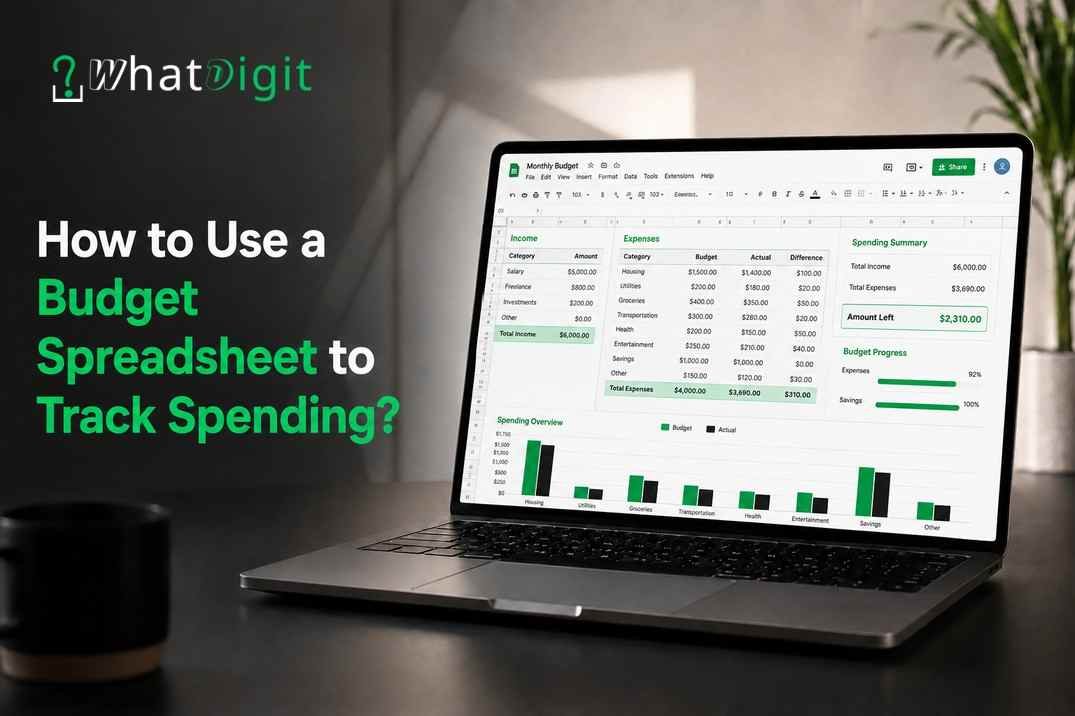
A budget spreadsheet gives you a structured way to record income, expenses, savings, and monthly spending in one place. Instead of relying on memory or checking separate accounts, you can see where your money goes and compare actual expenses with planned amounts. A useful spreadsheet does more than record transactions. It helps organize spending categories, highlight budget differences, monitor recurring bills, and show how much money remains after expenses. Consistent entries make the spreadsheet more useful because each month provides a clearer picture of your financial activity.
What Is a Budget Spreadsheet Template?
A budget spreadsheet template is a preformatted worksheet designed to organize income, expenses, savings, and other financial information. It usually includes categories, columns, formulas, and totals that make expense tracking easier than building a spreadsheet from an empty file.
A template can support personal, household, weekly, or monthly budgeting. Although layouts differ, most effective templates create a clear relationship between the money coming in and the money going out.
What Should a Budget Spreadsheet Include?
A useful spreadsheet should contain enough information to show both planned and actual financial activity. Adding too many fields, however, can make routine updates unnecessarily complicated.
Core sections commonly include:
Monthly take-home pay
Additional income
Fixed expenses
Variable expenses
Discretionary spending
Recurring bills
Savings contributions
Debt payments
Budgeted amounts
Actual amounts
Budget variance
Remaining monthly balance
Moreover, a date or transaction field can help users who want more detailed expense tracking.
Why Use a Template Instead of Starting From Scratch?
A template provides an existing structure, which reduces setup work and creates consistency across budgeting periods. Formulas may already calculate totals, balances, or differences between planned and actual spending.
However, the template should fit the user's budgeting needs. Someone tracking a simple personal budget may need only a few categories, while a household with multiple recurring expenses may benefit from additional detail.
How Does a Budget Spreadsheet Track Spending?
A budget spreadsheet tracks spending by recording expenses and grouping them into defined categories. The spreadsheet can then total each category and compare actual spending with the amount originally budgeted.
Consequently, users can identify where spending differs from their plan without reviewing every transaction individually.
Record Income Before Planning Expenses
Start with the amount of money available for the budgeting period. For many employees, take-home pay provides a more practical starting point than gross salary because it reflects the amount actually received after payroll deductions.
Income entries may include:
Regular paycheck income
Freelance or contract income
Side-business earnings
Rental income
Other recurring income
Variable income requires additional care. Rather than assuming every month will produce the same amount, record actual income as it becomes available.
Record Every Relevant Expense
Expense tracking works best when purchases and payments appear consistently in the spreadsheet. Rent, groceries, utility bills, insurance premiums, subscriptions, transportation costs, dining expenses, and other purchases can all affect the monthly balance.
For example, several small purchases may appear insignificant individually. Collectively, however, they may represent a substantial portion of discretionary spending.
How to Set Up a Budget Spreadsheet
A practical budget spreadsheet should make financial information easy to enter, review, and compare. Complicated layouts can discourage regular updates, so begin with the fields necessary for meaningful tracking.
The following process creates a simple structure that can work for many personal budgets.
1. Choose a Budgeting Period
Monthly budgeting works well for many people because numerous household bills follow a monthly schedule. However, weekly or biweekly tracking may suit people who prefer to align spending with paycheck dates.
Select one period and use it consistently. Consequently, comparisons between different periods become more meaningful.
2. Create the Main Columns
A basic spreadsheet can use columns for:
Expense category
Budgeted amount
Actual amount
Difference
Payment date
Notes
This structure separates expectations from actual financial activity. Moreover, the notes column can explain unusual expenses without creating additional categories.
3. Enter Expected Income
Add the income expected during the selected period. If income comes from several sources, enter each source separately before calculating total income.
For example, hypothetical monthly take-home pay could be $4,500 plus $300 in freelance income. The spreadsheet would show total available income of $4,800 before expenses.
4. Add Planned Expenses
List expected expenses and assign a budgeted amount to each category. Start with essential commitments before adding flexible spending.
Typical entries may include housing, utilities, groceries, transportation, insurance, minimum debt payments, subscriptions, entertainment, personal care, and savings.
5. Enter Actual Spending
Update the actual-spending column when expenses occur. Regular entries prevent a backlog of transactions and make the current budget more reliable.
Some users prefer daily updates, while others review transactions once or twice each week. Either approach can work when applied consistently.
6. Calculate the Remaining Balance
A simple calculation shows whether income covers recorded expenses:
Monthly Income − Monthly Expenses = Remaining Balance
A positive balance means recorded income exceeds recorded expenses for that period. In contrast, a negative balance indicates that expenses exceed the income entered into the spreadsheet.
How Should You Categorize Your Expenses?
Expense categories convert individual transactions into meaningful spending groups. Rather than reviewing dozens of unrelated purchases, users can see how much money goes toward housing, food, transportation, entertainment, and other priorities.
Categories should be specific enough to provide useful information without becoming difficult to maintain.
Separate Fixed and Variable Expenses
Fixed expenses generally remain relatively consistent from one budgeting period to another. Examples can include rent, mortgage payments, certain insurance premiums, and recurring subscription charges.
Variable expenses change according to usage or purchasing decisions. Common examples include:
Groceries
Gas
Dining out
Entertainment
Clothing
Household purchases
Personal care
Separating these expenses makes it easier to identify which costs offer more flexibility when spending needs adjustment.
Create a Category for Irregular Expenses
Not every expense arrives monthly. Vehicle maintenance, gifts, annual fees, seasonal purchases, and similar costs can create sudden pressure on a monthly budget.
Therefore, adding an irregular-expense category can make these costs more visible. Users can also divide an anticipated annual expense across several months when they want to plan for it gradually.
Avoid Excessive Categories
Too many categories can make transaction entry tedious. For instance, separate categories for coffee, takeout, restaurants, and snacks may provide more detail than necessary for some users.
A broader "Dining Out" category may provide sufficient information. The right level of detail depends on which spending decisions the spreadsheet needs to support.
Compare Planned Spending With Actual Spending
Budgeting becomes more informative when planned amounts are compared with actual expenses. This comparison shows whether spending remained within expectations and identifies categories requiring closer attention.
The difference between these amounts is commonly treated as a budget variance.
Calculate Budget Variance
A simple formula is:
Budgeted Amount − Actual Spending = Budget Variance
Suppose a household allocates $600 for groceries and spends $675. The calculation produces a negative $75 variance, indicating that grocery spending exceeded the planned amount by $75.
Conversely, spending $540 would leave $60 of the grocery allocation unused.
Review the Reason Behind the Difference
A variance alone does not explain why spending changed. Therefore, review the circumstances behind unusually high or low amounts.
Higher grocery expenses, for example, might reflect a larger shopping trip rather than an ongoing increase. Repeated negative variances across several months, however, may indicate that the budgeted amount no longer reflects normal spending.
Useful Spreadsheet Calculations for Expense Tracking
Spreadsheet formulas can reduce manual calculations and make updates easier. Even a simple budget can benefit from automatic totals and variance calculations.
The exact formula syntax depends on the spreadsheet application, but the underlying calculations remain straightforward.
Total Monthly Expenses
Add all recorded expenses to determine total spending for the selected period.
This figure can then be compared with total income. Moreover, separate totals for major categories can show which areas account for larger portions of monthly spending.
Remaining Income
Calculate:
Total Income − Total Expenses = Remaining Income
This figure provides a quick snapshot of how much recorded income remains after listed expenses. However, its accuracy depends on whether all relevant transactions have been entered.
Category Totals
Group transactions by category and calculate totals for housing, food, transportation, entertainment, and other areas.
Category totals are particularly useful when a spreadsheet contains individual transactions rather than one monthly figure for each spending group.
Savings Tracking
Savings can appear as a planned budget category rather than simply whatever remains after spending. Consequently, the spreadsheet can compare the planned savings contribution with the amount actually transferred or retained.
Users evaluating different formats may also choose to buy budget spreadsheet templates online in India when their specific budgeting requirements call for a ready-made structure, although the spreadsheet should still match the intended income, expense, and reporting needs.
How Can a Spreadsheet Reveal Overspending?
A budget spreadsheet reveals overspending by comparing actual expenses against predetermined amounts. Negative variances, rising category totals, and repeated spending increases can indicate areas requiring review.
One unusually expensive month does not necessarily establish a pattern. Therefore, comparing several budgeting periods can provide more useful context.
Look for Repeated Negative Variances
If dining, entertainment, groceries, or another flexible category repeatedly exceeds its budgeted amount, the spreadsheet highlights a consistent difference between the spending plan and actual behavior.
At that point, users can review whether spending should change or whether the budget itself needs a more realistic allocation.
Watch Small Recurring Charges
Subscriptions and automatic payments can be easy to overlook because individual charges may appear relatively small. However, several recurring payments can create a larger combined monthly expense.
List recurring charges separately when greater visibility would help. Consequently, unused or unnecessary expenses become easier to identify.
Compare Several Months
A single month provides a snapshot, while multiple months can reveal patterns. Compare category totals across three or more budgeting periods to identify recurring changes.
For example, steadily increasing transportation or grocery costs may require a budget adjustment even when individual transactions appear reasonable.
How Often Should You Update Your Budget Spreadsheet?
Update a budget spreadsheet often enough to keep the recorded balance reasonably close to actual financial activity. For many users, entering expenses several times per week prevents transactions from accumulating.
However, the best schedule is one that can be maintained consistently.
Use Short Check-Ins
A short recurring check-in can involve:
Entering recent purchases
Confirming bill payments
Updating income
Checking category totals
Reviewing remaining balances
Recording savings contributions
Correcting duplicate transactions
Regular maintenance also makes month-end review faster because most information has already been recorded.
Complete a Monthly Review
At the end of each budgeting period, compare planned and actual figures. Identify the largest variances and determine whether they resulted from one-time expenses or recurring patterns.
Then, adjust the next month's planned amounts when the existing budget no longer reflects realistic spending.
Avoid Common Budget Spreadsheet Mistakes
A spreadsheet can produce misleading results when entries are incomplete, duplicated, or categorized inconsistently. Reliable tracking depends more on accurate information than elaborate formatting.
Several common mistakes can reduce the usefulness of a budget.
Counting Credit Card Payments Twice
If individual credit card purchases are already recorded as expenses, entering the full credit card payment as another expense can duplicate the same spending.
Instead, choose a consistent accounting method. For spending analysis, recording the underlying purchases usually provides more useful category information.
Ignoring Cash Purchases
Cash spending can disappear from financial records more easily than card transactions. Therefore, record cash purchases manually when they occur or keep receipts until the next spreadsheet update.
Otherwise, the remaining balance may appear higher than the amount actually available.
Forgetting Annual and Seasonal Costs
Annual memberships, holiday purchases, school-related expenses, vehicle registration, and seasonal costs may not appear in a typical month.
Consequently, reviewing past expenses can help identify irregular costs that deserve their own planning category.
Setting Unrealistic Spending Limits
Extremely restrictive amounts can make a budget difficult to follow. Instead, use actual spending information to establish reasonable starting figures.
After several months of tracking, category averages and recurring patterns can provide a stronger basis for future planning.
Practical Ways to Improve Spending Tracking
Effective expense tracking depends on consistency and simplicity. A spreadsheet that requires excessive manual work may eventually stop being useful, regardless of how detailed its original design appears.
Therefore, prioritize information that supports real budgeting decisions.
Keep Categories Consistent
Use the same category names from month to month. If a restaurant purchase appears under "Food" one month and "Entertainment" the next, category comparisons become less reliable.
Establish simple classification rules and apply them consistently.
Separate Needs From Flexible Spending
Distinguishing essential commitments from discretionary purchases can provide additional context when expenses need adjustment.
Housing, basic utilities, insurance, and necessary transportation may offer limited short-term flexibility. Entertainment, optional subscriptions, and some dining expenses may allow more immediate changes.
Track Goals Alongside Expenses
A spreadsheet can include financial goals such as a savings target, emergency fund contribution, or planned large purchase.
Moreover, tracking progress beside monthly spending connects everyday financial decisions with longer-term priorities.
Conclusion
A budget spreadsheet turns individual transactions into organized financial information that can support better spending decisions. Recording income, categorizing expenses, comparing planned and actual amounts, and reviewing variances can reveal patterns that account balances alone may not show. Consistent updates improve accuracy, while simple categories make the process easier to maintain. Over time, monthly comparisons can help users refine spending plans, prepare for irregular costs, monitor savings, and keep financial priorities visible.
FAQs
1. What is the easiest way to track expenses in a spreadsheet?
Start with columns for date, expense description, category, budgeted amount, and actual amount. Record transactions consistently and calculate category totals. A simple structure usually works better than an overly detailed system because it reduces the effort required for routine updates while preserving useful spending information.
2. Should I track every purchase in my budget spreadsheet?
Tracking individual purchases provides the clearest picture of spending, particularly for flexible categories such as groceries, dining, and entertainment. However, recurring fixed bills can sometimes be recorded as monthly totals. The appropriate level of detail depends on how closely you need to monitor specific spending patterns.
3. How often should I update my spending spreadsheet?
Updating the spreadsheet several times per week can keep records current without requiring daily maintenance. People with frequent transactions may prefer daily entries, while those with fewer purchases may update weekly. Consistency matters more than frequency because long gaps increase the likelihood of missing or miscategorizing expenses.
4. What categories should a personal budget spreadsheet have?
Common categories include housing, utilities, groceries, transportation, insurance, debt payments, subscriptions, dining, entertainment, personal care, savings, and irregular expenses. Categories should reflect actual spending habits. Too many categories can make tracking unnecessarily complicated, while overly broad categories may provide insufficient information for useful spending decisions.
5. How do I track credit card spending without duplicating expenses?
Record individual credit card purchases in their appropriate spending categories. If those purchases already appear as expenses, avoid treating the later credit card payment as entirely new spending. Otherwise, the spreadsheet may count the same purchases twice. A consistent recording method keeps monthly expense totals more accurate.
6. Can a budget spreadsheet help identify unnecessary spending?
Yes. Category totals and budget variances can highlight areas where actual spending repeatedly exceeds planned amounts. Recurring subscriptions, frequent dining expenses, and small discretionary purchases may become more visible when grouped together. Reviewing several months provides better context than making decisions based on one unusually expensive budgeting period.
7. How should irregular expenses be included in a budget?
Create a separate category for irregular expenses or allocate part of the expected cost across several months. Annual fees, vehicle maintenance, gifts, and seasonal purchases can otherwise disrupt a monthly budget. Planning for these expenses gradually can make their eventual impact easier to see and manage.
8. What does budget variance mean in a spreadsheet?
Budget variance represents the difference between the amount planned for a category and the amount actually spent. Subtract actual spending from the budgeted amount. A negative result generally indicates spending exceeded the allocation, while a positive result indicates that part of the planned amount remained unused.
9. Should savings appear as an expense in a budget spreadsheet?
Savings can appear as a dedicated budget category even though they are not ordinary consumption expenses. Recording planned and actual savings contributions makes the goal visible alongside other financial priorities. Consequently, saving becomes an intentional part of the monthly plan rather than depending solely on leftover income.
10. Is a monthly or weekly budget spreadsheet better?
A monthly spreadsheet works well for people whose income and major bills follow monthly cycles. Weekly tracking can provide closer control over frequent variable expenses. Some users combine both approaches by maintaining a monthly budget while reviewing weekly spending totals to identify potential problems before the month ends.
Comments (0)