


Managing client information becomes more difficult as a business grows. A contact list may show who a company has worked with, but it does not necessarily show which relationships remain active, which clients have become inactive, or which accounts need attention. A structured client management Excel template can provide a central place to record client status, activity, follow-up dates, account ownership, and related information.
The value comes from creating a consistent process for maintaining client records. When active and inactive clients are clearly identified, businesses can prioritize communication, review dormant accounts, maintain accurate reporting, and avoid treating every customer relationship the same way.
Why Client Status Matters in Client Management
Client status provides a simple way to describe where a customer currently stands in the relationship. Without a status field, employees may have to infer whether a client is active from scattered notes, recent emails, project records, or personal knowledge.
A structured spreadsheet puts that information into a defined field.
For example, a business might use categories such as:
- Active
- Inactive
- Prospect
- New Client
- At Risk
- Renewal
- Lost
The exact categories should reflect the company's workflow. Not every business needs the same status system.
The important point is that employees should know what each status means and when a record should move from one category to another.
Active Clients Need Ongoing Visibility
An active client is generally a customer who currently has an ongoing relationship with the business. That relationship might involve an active project, recurring service, regular purchases, or continuing account management.
However, simply marking a client as active does not provide enough information by itself.
A useful client management workbook can connect active status with other fields such as:
- Last interaction
- Next follow-up
- Account owner
- Current project
- Service type
- Priority
- Contract status
- Notes
- Revenue or opportunity value
This creates a more useful account record.
For example, two clients may both be marked active, but one may have received a communication last week while another has not been contacted for several weeks. Their status is the same, but their immediate management requirements are different.
Inactive Clients Should Not Simply Disappear
Inactive clients are often treated as old records that no longer matter.
That can be a mistake.
An inactive customer may have stopped purchasing because a project ended, a contract expired, priorities changed, or communication simply stopped. In some cases, the relationship may still have future potential.
Keeping inactive clients in the same structured database allows businesses to retain their history without mixing them into current operational work.
This distinction is particularly useful when a company wants to review dormant accounts separately from its active customer base.
Inactive Does Not Always Mean Lost
A client marked inactive is not necessarily a permanently lost customer.
For example, a consulting engagement may end after six months. The customer can reasonably move to an inactive status even though the business relationship remains positive.
Later, a new project may create another opportunity.
A structured status field allows the account to move back into an active category when circumstances change.
That is more practical than deleting the record and losing valuable historical information.
A Client Management Excel Template Creates One Central Record
Without a structured system, client information can become scattered across email, notebooks, separate spreadsheets, project files, and individual employee records.
That fragmentation creates uncertainty.
A central client management workbook can bring important information into one place.
A typical client record might include:
Client Information
Name, company, phone, email, and location.
Relationship Status
Active, inactive, prospect, or another defined category.
Activity
Last contact, communication type, meeting date, and notes.
Follow-Up
Next action, due date, owner, and priority.
Business Information
Service type, opportunity value, contract status, or account category.
When these fields exist together, users can evaluate the current state of a relationship without searching multiple sources.
Tracking Last Interaction Helps Identify Dormant Accounts
The last interaction date is one of the most useful fields for monitoring client activity.
Suppose a client is marked active, but the last recorded interaction occurred several weeks ago. That does not automatically mean the account should become inactive. However, it provides a reason to review the record.
A business might use the field to identify:
- Clients requiring follow-up
- Accounts with reduced engagement
- Customers awaiting a response
- Accounts approaching renewal
- Records requiring status review
The field becomes even more useful when combined with a next-follow-up date.
Next Follow-Up Creates a Forward-Looking Workflow
Last interaction describes what happened.
Next follow-up describes what should happen next.
That distinction matters.
A client management spreadsheet can record:
Last Interaction: Project review meeting
Next Follow-Up: Send revised proposal
Follow-Up Date: September 5
Owner: Account Manager
Status: Active
This structure gives the team a specific next action rather than leaving the record as a historical entry.
A follow-up field can also help separate genuinely active accounts from clients who have been labeled active simply because nobody updated their status.
How Excel Filters Help Separate Client Groups
Excel filtering makes status-based management practical.
If a workbook contains hundreds of client records, users can filter the status column to display only:
Active Clients
or:
Inactive Clients
The same database can then be filtered further.
For example:
Active + High Priority
or:
Inactive + Former Customer
or:
Active + Follow-Up Due
This eliminates the need to maintain separate worksheets for every client category.
Maintaining one primary database is generally easier than keeping multiple manually synchronized lists.
Combining Status With Other Fields
Status becomes much more valuable when combined with additional client attributes.
Consider a workbook containing:
- Client Status
- Industry
- Account Owner
- Last Interaction
- Next Follow-Up
- Customer Tier
A manager could filter for:
Active + Premium + No Recent Interaction
That creates a focused list for account review.
Another filter might identify:
Inactive + Former Customer + High Historical Value
This could support a re-engagement review.
The spreadsheet does not determine which accounts deserve attention automatically. Instead, it makes the relevant records easier to identify.
Dashboards Can Summarize Active and Inactive Clients
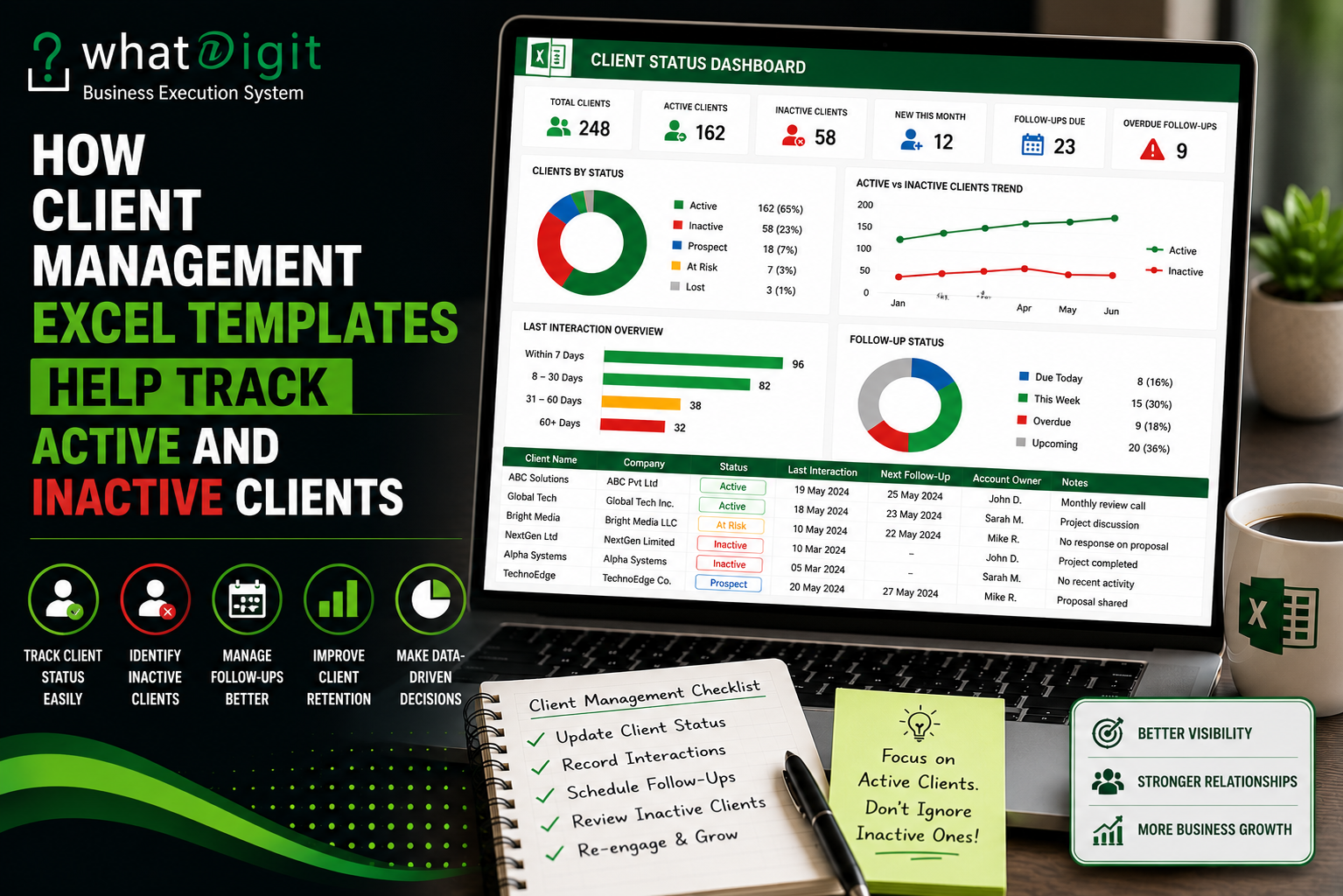
A client management dashboard can provide a visual summary of account status.
For example, a dashboard might display:
- Total Clients
- Active Clients
- Inactive Clients
- Prospects
- At-Risk Accounts
- Follow-Ups Due
A chart can also show the distribution of client statuses.
This can help managers quickly see whether the customer database contains a large inactive population or whether most records remain active.
The exact dashboard capabilities vary between templates, so buyers should verify which metrics, charts, filters, and formulas are actually included.
Status Tracking Improves Data Maintenance
Client status is only useful when employees maintain it.
A client who completed a project six months ago should not necessarily remain marked active forever simply because nobody changed the status.
Businesses should establish practical rules.
For example:
Active: Current business relationship or ongoing engagement.
Inactive: No current engagement but historical relationship retained.
Prospect: Potential customer that has not yet become an active client.
Lost: Relationship ended with no current expectation of continuation.
These definitions should be documented inside the workbook or company process.
Consistency matters more than choosing a particular set of labels.
Conditional Formatting Can Highlight Client Status
Conditional formatting can make status information easier to scan.
For example, a workbook may visually distinguish:
- Active clients
- Inactive clients
- Overdue follow-ups
- High-priority accounts
- Renewal accounts
This can reduce the time required to identify important records.
However, formatting should support the data rather than replace it.
A colored cell is useful only when users know what the color means. The underlying status field should remain explicit and readable.
Client Status and Follow-Up Status Are Different
One common spreadsheet mistake is treating client status and follow-up status as the same thing.
They are not.
A client can be:
Active
while having:
No Follow-Up Scheduled
Another client can be:
Active
with:
Follow-Up Due
A third can be:
Inactive
but have:
Reactivation Follow-Up Planned
Separating these concepts provides a more accurate picture of account management.
Client status describes the relationship.
Follow-up status describes the next activity.
Both can exist in the same workbook without being confused.
Tracking Activity Helps Validate Client Status
Status should not exist in isolation.
Activity records can provide supporting context.
Useful activity fields may include:
- Activity date
- Activity type
- Contact person
- Employee
- Outcome
- Next action
- Notes
For example, a client marked active may have recent calls, meetings, or project updates.
An inactive client may have no recorded activity for an extended period.
This information can help employees review whether the assigned status still reflects the actual relationship.
How Client Management Templates Support Account Reviews
Regular account reviews can become easier when the spreadsheet contains structured status and activity data.
A manager could review:
Active Accounts
Which clients have ongoing work?
Which accounts require follow-up?
Which clients have upcoming renewals?
Which accounts have no defined next action?
Inactive Accounts
Which customers recently became inactive?
Which accounts have valuable historical relationships?
Which former clients could reasonably be contacted again?
Which records should remain archived?
This turns status tracking into an operational process rather than a simple labeling exercise.
Inactive Client Tracking Can Support Re-Engagement
Some businesses may want to reconnect with former customers.
An inactive client list can provide a starting point.
However, re-engagement should be based on appropriate business criteria rather than automatically contacting every inactive record.
Potential considerations include:
- Previous service
- Last engagement
- Reason for inactivity
- Historical relationship
- Account value
- Current business relevance
- Previous communication preferences
A spreadsheet can organize these fields, but the business should determine its own communication policies and customer-contact practices.
Client Segmentation Becomes Easier
Active and inactive status can also form part of broader segmentation.
A business may categorize clients by:
- Status
- Industry
- Size
- Customer tier
- Service
- Location
- Account owner
- Engagement level
For example, a dashboard could show active clients by industry while a separate report displays inactive accounts by previous service type.
This creates more useful business information than a simple alphabetical customer list.
Managing Active Clients by Priority
Not every active client requires the same level of attention.
A priority field can help distinguish:
- High Priority
- Medium Priority
- Low Priority
The criteria should be defined internally.
For example, priority might reflect project urgency, service requirements, strategic importance, or an upcoming deadline.
Combining priority with active status can help account managers organize their workload.
A client management template may therefore support several related dimensions rather than forcing every customer into one category.
Maintaining Historical Records
Deleting inactive clients may seem like a way to keep the spreadsheet clean.
It can also remove useful information.
Historical records may provide context about:
- Previous projects
- Past communication
- Former account owners
- Services provided
- Previous opportunities
- Relationship history
Keeping inactive records does not mean they should clutter the primary working view.
Filters, separate status views, archived sections, or reporting logic can keep the operational area focused while preserving historical information.
Avoiding Duplicate Client Records
Status tracking becomes unreliable when the same customer appears multiple times.
For example:
ABC Consulting — Active
and:
ABC Consulting LLC — Inactive
may represent the same organization.
Without consistent naming and identification rules, the database can produce misleading client counts.
A structured template should encourage consistent client identifiers and contact information.
Businesses may also use fields such as:
- Client ID
- Company name
- Primary contact
- Account owner
The exact structure depends on the business.
Data Validation Can Improve Status Accuracy
Dropdown menus can prevent employees from entering inconsistent status values.
Instead of allowing users to type anything into the status field, the workbook can provide predefined choices.
For example:
Active | Inactive | Prospect | Lost
This reduces variations such as:
- Active Client
- active
- Current
- Existing Client
Standardized values are easier to filter, count, and report.
If the template permits customization, businesses can modify these options to match their workflow.
Formula-Based Status Indicators
Some templates may use formulas to calculate additional indicators.
For example, a workbook might calculate whether a follow-up is overdue based on:
Next Follow-Up Date − Current Date
It could then display:
- Upcoming
- Due
- Overdue
Another formula might calculate the number of days since the last interaction.
These calculations can support status reviews.
However, formula-based indicators should not be confused with manually assigned client status. A formula can identify inactivity based on dates, but the business may still need a human decision before changing an account's actual relationship status.
Why Automated Status Logic Needs Caution
Automation can make spreadsheets more efficient, but automatic status changes can be risky.
Imagine a client has no recorded interaction for 30 days.
That does not necessarily mean the relationship is inactive.
The customer may have an ongoing project that does not require frequent communication.
Therefore, a template can use inactivity indicators as signals for review rather than automatically changing a customer's relationship status without appropriate business rules.
This distinction is important when designing or customizing client management spreadsheets.
Active and Inactive Client Reporting
Reporting becomes more useful when status data remains consistent.
A monthly review might include:
- Total client records
- Active accounts
- Inactive accounts
- New clients
- Recently inactive clients
- Re-engaged clients
- Follow-ups due
- Overdue follow-ups
These figures can provide a basic operational snapshot.
However, businesses should avoid assuming that a higher percentage of active clients automatically means better performance. Client status needs to be interpreted alongside revenue, engagement, retention, project activity, and business objectives.
When a Basic Spreadsheet May Be Enough
A simple Excel client tracker may work well for a freelancer or small business with a limited number of accounts.
If the workflow only requires:
- Client name
- Contact information
- Status
- Last contact
- Next follow-up
- Notes
there may be no need for an elaborate workbook.
Adding unnecessary complexity can create more administrative work.
The right level of functionality depends on the actual client-management process.
When a More Advanced Template Makes Sense
A more structured template may provide greater value when a business needs several connected functions.
These might include:
- Client database
- Status tracking
- Follow-up management
- Sales pipeline
- Task tracking
- Account ownership
- Dashboards
- Reporting
- Segmentation
- Automated calculations
The benefit comes from having related information organized within one workflow.
Businesses considering whether to buy Client Management Excel Template online in USA should evaluate the actual features, compatibility, customization options, documentation, and workflow fit rather than choosing based only on appearance or price.
How to Choose a Client Management Template
Before selecting a template, identify the information the business needs to manage.
Ask:
- Can client status be customized?
- Can active and inactive clients be filtered easily?
- Is there a field for last interaction?
- Can users record next follow-ups?
- Are dropdown lists included?
- Do formulas update automatically?
- Does the dashboard reflect status changes?
- Can historical clients remain in the database?
- Can new records be added without breaking calculations?
- Is the workbook compatible with the Excel version being used?
These questions provide a more practical evaluation than simply counting the number of worksheets.
Common Mistakes in Client Status Tracking
Several habits can make status tracking unreliable.
Using Too Many Statuses
If employees cannot easily distinguish between categories, the system becomes confusing.
Never Updating Old Records
An outdated status is often worse than no status because it creates false confidence.
Mixing Relationship and Follow-Up Status
These should normally be separate fields.
Deleting Inactive Clients
Historical records may remain useful.
Allowing Free-Form Status Entry
Different spellings and labels can damage reporting consistency.
Over-Automating Status Changes
Date-based inactivity does not always equal relationship inactivity.
A Practical Client Status Workflow
A simple workflow could look like this:
New Prospect
A potential customer enters the database.
↓
Active Client
The prospect becomes a customer and begins an active relationship.
↓
Active — Follow-Up Due
The relationship remains active, but an action is required.
↓
Active — Ongoing
The account continues without an immediate follow-up issue.
↓
Inactive
The current engagement ends or the relationship becomes dormant.
↓
Reactivation Opportunity
The business identifies a legitimate reason to reconnect.
This workflow is only an example. Each business should define its own status rules.
Why Consistency Matters More Than Complexity
A sophisticated workbook with dozens of fields is not automatically better than a simple one.
If employees fail to update the information, the extra functionality has little value.
A smaller template that the team consistently maintains can produce more reliable information than a complex system that nobody wants to use.
Therefore, the best client management Excel template balances:
- Functionality
- Simplicity
- Data accuracy
- Ease of use
- Customization
- Reporting
- Maintenance
The objective is not to capture every possible piece of customer information. It is to capture the information that supports useful business decisions.
Frequently Asked Questions
What is the difference between an active and inactive client?
An active client generally has a current business relationship, such as an ongoing project, recurring service, or continuing account activity. An inactive client typically has no current engagement but remains part of the historical customer database. Each business should define its own status criteria so employees apply classifications consistently.
Can an Excel template automatically identify inactive clients?
Some templates can calculate inactivity indicators using dates such as the last interaction or last transaction. However, an inactivity indicator should not automatically determine relationship status in every situation. A customer may have low communication frequency while still maintaining an active relationship, so human review may remain necessary.
Why should inactive clients remain in the database?
Inactive clients may contain valuable historical information, including previous projects, services, contacts, and communication records. Keeping those records allows businesses to maintain relationship history and potentially evaluate appropriate re-engagement opportunities without rebuilding the customer record from scratch.
Can active and inactive clients be displayed on separate sheets?
Yes, depending on the template's structure. However, maintaining one primary database and using filters or calculated views is often easier than manually copying records between separate worksheets. Separate sheets can become outdated when users update one version but forget to update another.
What fields should an active client record contain?
Useful fields can include client name, company, contact details, status, account owner, last interaction, next follow-up, priority, service type, notes, and relevant business information. The exact fields should reflect the workflow. Adding unnecessary fields can increase data-entry effort without providing meaningful operational value.
How do dropdowns improve client status tracking?
Dropdowns standardize the values employees can select. Instead of entering variations such as “Active,” “active client,” or “Current,” users select from predefined categories. This makes filtering, formulas, dashboards, and reports more reliable because the workbook works with consistent values.
Can client status be connected to follow-up tracking?
Yes. A workbook can maintain separate fields for relationship status and follow-up status. For example, a client can remain active while having an overdue follow-up. Separating these fields gives users a clearer picture of both the customer relationship and the work that needs attention.
Is a premium client management template necessary for status tracking?
Not always. A basic spreadsheet may be sufficient when a business manages a small number of clients and needs only simple status, contact, and follow-up fields. A more advanced template may be worthwhile when the business also requires dashboards, automation, segmentation, reporting, or multiple connected workflows.
Can a client management Excel template be customized for different status categories?
Many templates can be customized, but functionality varies. Users should check whether dropdown lists, formulas, dashboards, conditional formatting, and reports depend on predefined categories. Changes should be made carefully because modifying the wrong cells or reference lists can affect other parts of the workbook.
What should I check before purchasing a client management Excel template?
Check the workbook structure, status fields, filtering, follow-up tracking, formulas, dashboards, customization options, instructions, scalability, and Excel compatibility. Also verify how new records are added and whether active and inactive clients can be managed without duplicating data. The best choice is the template that fits the actual workflow rather than the one with the longest feature list.
Conclusion
Client management Excel templates can make active and inactive client tracking more practical by placing status, activity, follow-ups, ownership, and customer information within a structured workflow. The most useful systems do more than label customers. They help teams identify which relationships require attention, preserve valuable historical records, maintain cleaner data, and create useful filtered or visual views.
The key is consistency. Clear status definitions, standardized data entry, reliable formulas, appropriate filtering, and regular record maintenance matter more than simply adding more spreadsheet features. A well-designed template should make client status easier to manage without making everyday work unnecessarily complicated.
Comments (0)