


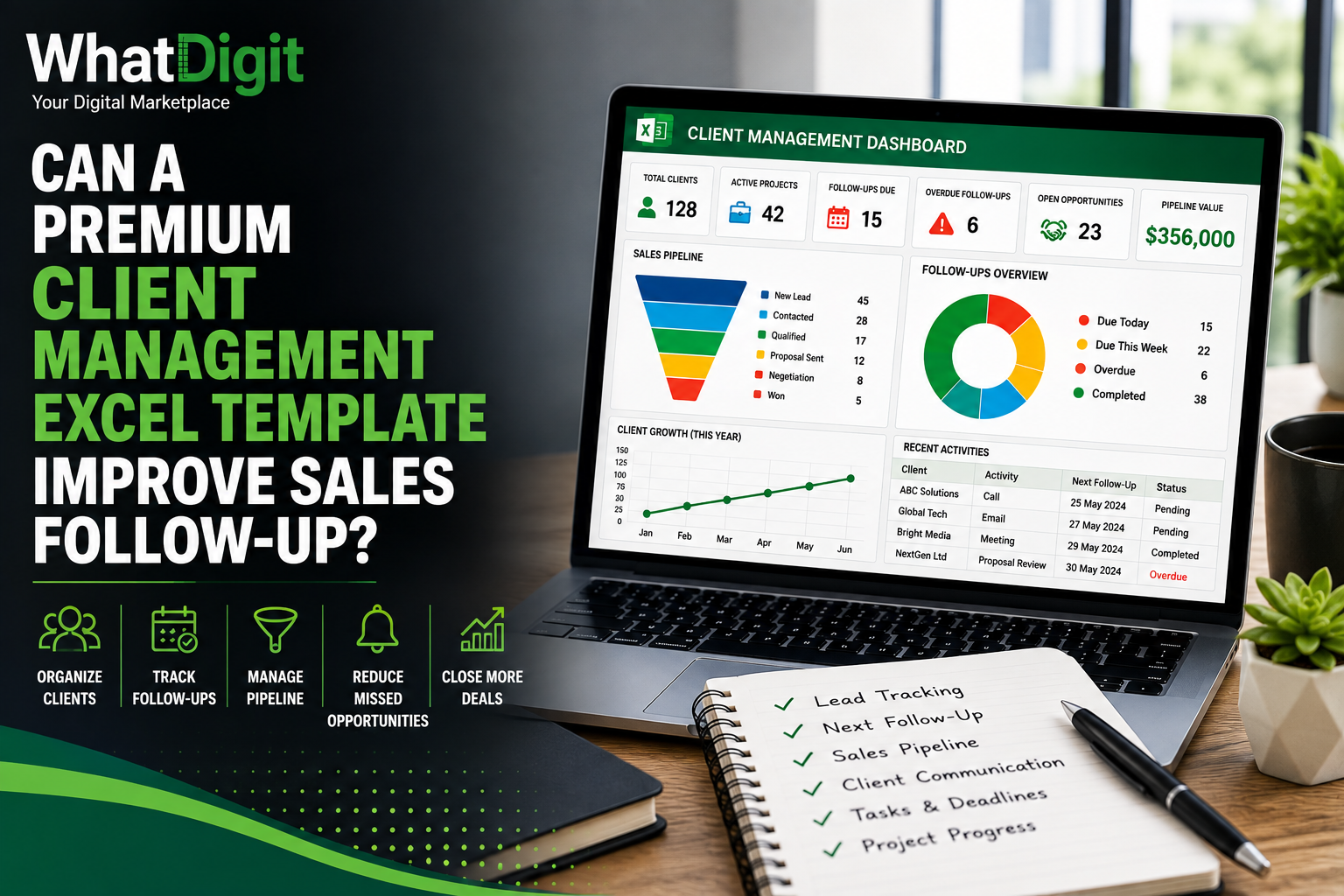
Sales follow-up sounds simple: contact the prospect, send the proposal, check back later, and move the conversation forward.
In practice, it is one of the easiest parts of the sales process to lose control of.
A salesperson may speak with dozens of prospects in a week. Some need a follow-up tomorrow, others next week, while another prospect may be waiting for a proposal or internal approval. When those details are scattered across email, notebooks, messaging apps, calendars, and disconnected spreadsheets, follow-up becomes dependent on memory.
That is where a premium client management Excel template can become useful.
A well-designed template does not magically increase sales. That would be an unrealistic claim. What it can do is create a more disciplined follow-up system by organizing client information, next actions, deadlines, sales stages, communication history, and opportunity data in one place.
The result is better visibility into who needs attention, why they need attention, and what should happen next.
Why Sales Follow-Up Often Breaks Down
Most sales teams do not struggle because they do not understand the importance of follow-up. They struggle because follow-up information becomes fragmented.
Consider a salesperson managing 80 prospects.
Ten prospects may have received proposals. Fifteen may require another call. Several may have asked for pricing. Others may be waiting for management approval. Some may have gone quiet after an initial conversation.
If all of this information exists only inside emails and personal notes, the salesperson has to remember the context of every conversation.
That is not a reliable system.
A structured client management Excel template can turn those scattered interactions into organized records.
Instead of asking:
“Who was I supposed to call today?”
the salesperson can review a follow-up list showing:
- Client or prospect
- Sales stage
- Last contact date
- Next follow-up date
- Follow-up type
- Assigned salesperson
- Priority
- Opportunity value
- Current status
- Notes
- Next action
That difference may appear small, but it changes how the sales process is managed.
What Makes a Client Management Excel Template “Premium”?
The word premium should not simply mean a spreadsheet with attractive colors and a large number of worksheets.
A premium template should provide meaningful functionality that saves time or improves visibility.
For sales follow-up, useful features may include:
- Structured client database
- Lead tracking
- Sales pipeline
- Follow-up scheduler
- Communication history
- Next-action tracking
- Priority indicators
- Automated status calculations
- Conditional formatting
- Sales dashboards
- KPI summaries
- Filtering and sorting
- Customizable dropdowns
- Instructions and documentation
The important distinction is between visual complexity and functional value.
A workbook with 20 sheets is not automatically better than one with six well-designed sheets.
The real question is:
Does the template make sales follow-up easier and more consistent?
How a Client Management Excel Template Improves Follow-Up
The biggest advantage is centralized visibility.
A sales follow-up system needs to answer several questions quickly:
- Who needs to be contacted?
- When should they be contacted?
- What happened during the previous interaction?
- What stage is the opportunity in?
- What action should happen next?
- Who is responsible?
- How valuable is the opportunity?
A structured Excel template can bring these answers together.
1. Centralize Prospect and Client Information
The first step is creating a reliable client database.
Instead of storing contacts in multiple files, the template can provide a standardized database containing information such as:
- Company name
- Contact name
- Phone
- Location
- Lead source
- Industry
- Salesperson
- Client status
- Sales stage
- Opportunity value
- Last contact date
- Next follow-up date
This creates a consistent foundation for follow-up management.
Without structured data, even the best dashboard will be unreliable.
Why Data Structure Matters
Imagine that one salesperson enters:
Proposal Sent
while another enters:
Proposal sent
and another writes:
Sent proposal
Excel may treat these as different values when filtering or summarizing data.
Dropdown lists and standardized statuses can reduce these inconsistencies.
That makes reporting more reliable and follow-up lists easier to manage.
2. Create a Dedicated Follow-Up Tracker
The follow-up tracker is arguably the most important component for sales activity.
A practical tracker might contain:
Prospect
Last Contact
Next Follow-Up
Stage
Priority
Owner
Status
ABC Solutions
Aug 18
Aug 25
Proposal
High
Sales Rep A
Pending
XYZ Services
Aug 20
Aug 27
Qualified
Medium
Sales Rep B
Pending
Global Tech
Aug 15
Aug 22
Negotiation
High
Sales Rep A
Overdue
The salesperson can filter the table by date, owner, priority, or status.
This is far more practical than scanning an entire client database every morning.
3. Make Overdue Follow-Ups Visible
One of the biggest problems with manual follow-up systems is that overdue activities can disappear inside old records.
Conditional formatting can make overdue follow-ups visually obvious.
For example:
- Completed → normal status
- Due Today → attention required
- Due Soon → upcoming
- Overdue → urgent
- No Follow-Up Date → requires review
This creates a simple visual prioritization system.
However, there is an important limitation.
Highlighting an overdue task does not complete the task.
The template improves visibility. The salesperson still has to take action.
That distinction matters because no Excel formula can fix poor sales discipline.
4. Track the Next Action Instead of Just the Last Interaction
A common weakness in basic CRM spreadsheets is recording what already happened but failing to define what happens next.
For example:
Last Contact: Sent proposal
That tells you what happened.
But:
Next Action: Call client to review proposal
Follow-Up Date: August 28
Owner: Rahul
is much more useful operationally.
The purpose of sales tracking is not to create a historical archive. It is to keep opportunities moving.
Therefore, a premium template should ideally include both last activity and next action.
5. Connect Follow-Up With Sales Stages
Follow-up makes more sense when it is connected to the sales pipeline.
A typical pipeline could include:
- New Lead
- Contacted
- Qualified
- Discovery
- Proposal Sent
- Negotiation
- Won
- Lost
Each stage can have different follow-up requirements.
For example:
New Lead
The next action may be an introductory call.
Qualified
The next action may be a discovery meeting.
Proposal Sent
The next action may be proposal review.
Negotiation
The next action may be a pricing discussion.
Won
The next action may be onboarding.
This approach prevents the follow-up system from becoming a simple reminder list.
Instead, it becomes part of the broader sales workflow.
6. Prioritize High-Value Opportunities
Not every follow-up deserves equal priority.
Suppose a salesperson has:
- 10 small opportunities
- 3 medium opportunities
- 2 major enterprise opportunities
A basic follow-up list treats them equally.
A more useful system can include:
- Opportunity value
- Probability
- Priority
- Sales stage
- Expected closing date
This helps salespeople decide where to spend their limited time.
For example, a high-value opportunity in negotiation with a decision expected this week may deserve attention before a low-value lead that has only recently entered the pipeline.
That is a more intelligent use of follow-up data.
7. Use a Sales Dashboard for Quick Visibility
A dashboard can turn a detailed follow-up database into a management view.
Useful metrics may include:
- Total leads
- Active opportunities
- Follow-ups due today
- Overdue follow-ups
- Proposals sent
- Negotiations
- Won opportunities
- Lost opportunities
- Pipeline value
- Expected sales
A manager can then understand the current sales situation without manually reviewing every record.
Example
Imagine the dashboard shows:
120 Active Leads
18 Follow-Ups Due
7 Overdue
24 Proposals Open
$185,000 Pipeline
The manager immediately knows that follow-up activity needs attention.
Without a dashboard, those numbers might remain hidden inside hundreds of spreadsheet rows.
8. Monitor Sales Follow-Up Performance
A premium template can also help managers examine whether follow-up activity is actually happening.
Possible metrics include:
- Follow-ups completed
- Follow-ups overdue
- Follow-ups by salesperson
- Calls completed
- Meetings completed
- Proposals followed up
- Opportunities without recent activity
This creates accountability.
However, managers should be careful about using activity counts as a direct measure of sales performance.
A salesperson completing 100 calls is not necessarily performing better than someone completing 30 highly targeted calls.
Activity data is useful context, not the complete definition of performance.
9. Prevent Opportunities From Going Quiet
A prospect does not always explicitly say “no.”
Sometimes the conversation simply stops.
The salesperson sends an email. There is no response. A week passes. Another message is sent. Another week passes.
Eventually, the opportunity becomes forgotten.
A client management template can identify prospects that have not been contacted recently.
For example, the workbook could calculate:
Days Since Last Contact
This makes inactive opportunities easier to identify.
A manager could then filter prospects where:
Days Since Last Contact > 14
and decide whether those prospects require another follow-up, a different communication approach, or removal from the active pipeline.
10. Keep Communication History With the Opportunity
Follow-up becomes much more effective when the salesperson remembers the previous conversation.
A communication log can include:
- Date
- Contact method
- Person contacted
- Discussion summary
- Client response
- Objection
- Action required
- Follow-up date
This reduces the need to search through old emails before contacting the prospect.
It also helps when another employee takes over the account.
Instead of starting from scratch, they can review the recorded history.
Can Excel Actually Increase Sales?
This is where businesses need to be realistic.
Excel itself does not generate sales.
A template cannot convince a prospect to buy, improve a weak product, or fix bad sales messaging.
What it can improve is the operational layer around sales.
For example:
Better organization → better visibility → fewer forgotten actions → more consistent follow-up.
That can contribute to better sales execution.
But the relationship is indirect.
If the sales process itself is weak, a beautiful Excel dashboard will not rescue it.
Premium Template vs. Basic Spreadsheet
The difference can be substantial.
Feature
Basic Spreadsheet
Premium Template
Contact List
✓
✓
Lead Tracking
Basic
Structured
Follow-Up Dates
Manual
Organized
Sales Pipeline
Limited
Integrated
Priority Tracking
Limited
✓
Communication History
Basic
Structured
Automated Calculations
Few
More Extensive
Conditional Formatting
Limited
✓
Dashboard
Usually No
Often Included
KPI Reporting
Manual
Automated
Customization
Basic
More Flexible
Documentation
Sometimes
Often Included
This does not mean every premium template is better.
A poorly designed premium workbook can still be worse than a simple free spreadsheet.
Functionality must be evaluated, not assumed from the price.
When Is a Premium Template Worth Buying?
A premium template becomes easier to justify when the business has enough sales activity for organization to matter.
It may be useful when:
- The sales team manages many leads.
- Follow-ups are frequently missed.
- Client information is scattered.
- Managers need pipeline visibility.
- Salespeople need a centralized workflow.
- Reports are currently created manually.
- Opportunities are getting lost because nobody knows the next action.
- The company is not ready for a full CRM system.
For a salesperson managing ten prospects, a complex dashboard may be unnecessary.
For a team managing hundreds of opportunities, centralized tracking can become much more valuable.
When Excel May Not Be the Right Solution
There is a point where Excel stops being the best tool.
A dedicated CRM may be more appropriate when the organization requires:
- Multiple simultaneous users
- Advanced permissions
- Automated email sequences
- Email synchronization
- Mobile-first workflows
- Detailed activity history
- Customer portals
- Advanced integrations
- Complex automation
- Large-scale databases
- Advanced reporting
A spreadsheet can be powerful, but it should not be forced to behave like enterprise CRM software.
The right question is not:
“Can Excel do this?”
It is:
“Is Excel still the most practical tool for this workflow?”
How to Get More Value From a Client Management Excel Template
Buying a template is only the beginning.
To get actual value from it, establish a consistent process.
Step 1: Enter Every Active Prospect
Do not keep some prospects inside the workbook and others in personal notes.
Step 2: Define a Sales Stage
Every opportunity should have a current stage.
Step 3: Record the Last Interaction
Keep enough information to understand what happened.
Step 4: Define the Next Action
Every active opportunity should have a logical next step.
Step 5: Assign a Date
A next action without a date is easy to forget.
Step 6: Assign Ownership
Someone must be responsible for the follow-up.
Step 7: Review the Follow-Up List Daily
The system only works when it becomes part of the sales routine.
Step 8: Review Pipeline Performance Weekly
Managers should look beyond individual tasks and examine overall pipeline movement.
Common Mistakes to Avoid
Even an advanced template can become useless if the workflow is poorly managed.
Avoid:
Leaving Follow-Up Dates Blank
If a prospect requires action, the next action should normally have a date.
Using Too Many Statuses
Twenty different statuses can make the system harder to understand.
Entering Duplicate Clients
Duplicate records distort reporting and create confusion.
Ignoring Old Opportunities
A pipeline filled with dead opportunities creates misleading numbers.
Overloading the Dashboard
Too many charts reduce clarity.
Editing Formulas Accidentally
Protect or clearly identify calculation areas where appropriate.
Treating Activity as Sales
More calls do not automatically equal more revenue.
Failing to Update the Workbook
An outdated CRM spreadsheet is worse than a simple but accurate one.
How to Evaluate a Premium Client Management Excel Template
Before purchasing one, review the actual workflow rather than judging only the screenshots.
Ask:
- Can I track leads and existing clients?
- Can I record the last interaction?
- Can I schedule the next follow-up?
- Can I identify overdue follow-ups?
- Can I track sales stages?
- Can I assign opportunities to team members?
- Can I record opportunity value?
- Does the dashboard update automatically?
- Can I customize statuses and categories?
- Are instructions included?
- Can the workbook handle additional records?
- Does it work with my Excel version?
These questions reveal much more than the number of worksheets included.
10 Frequently Asked Questions
Can a premium client management Excel template improve sales follow-up?
Yes, it can improve the organization and visibility of sales follow-up. It can centralize client information, track next actions, identify overdue activities, and provide pipeline visibility. However, it cannot guarantee better sales because actual results also depend on product quality, sales strategy, communication, pricing, and execution.
How does Excel help prevent missed sales follow-ups?
A structured template can record next-follow-up dates, owners, priorities, and statuses. Conditional formatting and dashboards can make overdue or upcoming activities easier to identify. The system reduces the chance of overlooking an activity, provided users consistently update and review it.
What should a sales follow-up Excel template contain?
A useful template can include client information, lead source, sales stage, last contact date, next follow-up date, next action, salesperson, priority, opportunity value, communication history, and status. A dashboard can provide additional visibility into the overall pipeline.
Is a premium Excel template better than a free CRM spreadsheet?
Not automatically. A premium template may offer better structure, automation, dashboards, documentation, and customization, but quality varies. A free spreadsheet may be perfectly adequate for a simple sales process. Compare functionality against actual requirements rather than assuming premium means better.
Can an Excel template replace CRM software?
For simple sales operations, Excel can function as a lightweight CRM. However, dedicated CRM platforms generally provide stronger collaboration, automation, integrations, permissions, and scalability. Businesses should consider moving to specialized software when their sales workflow becomes too complex for reliable spreadsheet management.
How often should sales follow-up data be updated?
Ideally, the information should be updated immediately after a meaningful sales interaction. Waiting several days increases the risk of forgetting details. A daily review of upcoming and overdue follow-ups can also help keep the pipeline active.
Can dashboards show overdue sales follow-ups?
Yes. A properly designed dashboard can summarize overdue follow-ups using formulas, conditional formatting, PivotTables, or other Excel functionality. The exact implementation depends on how the workbook is built.
How can salespeople prioritize follow-ups?
Priority can be based on factors such as opportunity value, sales stage, expected decision date, customer urgency, probability, and time since last contact. A premium template can include these fields so salespeople can filter and prioritize their workload more systematically.
What is the most important follow-up field?
There is no single field that matters in every sales process, but Next Action + Next Follow-Up Date is one of the most operationally useful combinations. Knowing what needs to happen and when it should happen turns a historical client record into an actionable sales task.
Is a premium client management Excel template suitable for small businesses?
Yes, particularly when a small business has outgrown a basic contact list but is not ready for dedicated CRM software. The template should remain simple enough for the team to maintain. If it becomes more complicated than the sales process itself, it is probably the wrong solution.
Conclusion
A premium client management Excel template can improve sales follow-up, but its value needs to be understood correctly.
It does not sell to customers for you.
It does not replace sales strategy.
It does not guarantee higher conversion rates.
What it can do is create a more disciplined system for managing the operational side of sales.
By bringing together client records, sales stages, communication history, follow-up dates, next actions, priorities, opportunity values, and dashboards, a well-built template can make it much harder for important opportunities to disappear into a pile of emails and notes.
The strongest system is ultimately simple:
Know the client → know the sales stage → know the last interaction → know the next action → know the follow-up date → take the action.
That is where a client management Excel template earns its value.
Comments (0)